NEWTry every module free for 14 days. No credit card, no setup call.
fluxems
IndustriesHelpBlogPricingChangelogAbout
OperationalLog inStart free trial
/
Help Center home
Getting started
  • Welcome to fluxems
  • How fluxems is organised
  • Create your first project
  • Invite people to your workspace
  • Upload your first documents
  • Customise your dashboard
Documents
  • The document register
  • Understand versions and revisions
  • Upload a new revision
  • Set a revision as current
  • Document statuses explained
  • Update a document's status
  • Review and approve documents
  • Suitability, disciplines, and references
  • Confidentiality levels and private documents
  • Search, filter, and star documents
  • Browse files with Explorer and folder templates
  • Document workflows and action requests
Transmittals
  • What is a transmittal?
  • Issue a transmittal
  • Respond to a transmittal you received
  • Track acknowledgements
  • Recall a transmittal
RFIs
  • What is an RFI?
  • Raise an RFI
  • Answer an RFI
  • Track RFIs to closure
Projects and delivery
  • Project overview and activity
  • Add members and manage labels
  • Plan work with work items
  • Track milestones
  • Project photos
  • Project settings: general and documents
  • Follow everything with the change log
Mail
  • How project mail works
  • Compose mail, RFIs, and transmittals from the inbox
  • Triage with labels
  • Save, archive, and find mail
Tendering
  • The tender register
  • Find tenders
  • Manage tender documents and collaboration
Calendar and tasks
  • Manage your tasks
  • Use the calendar
Contacts
  • Search contacts and organisations
  • Manage organisations and people
  • Distribution lists
Workspace administration
  • Workspace settings overview
  • Manage users and teams
  • Read the audit log
  • Configure document settings
  • Configure transmittal reasons and distribution lists
  • Configure work items and custom fields
Browse the Help Center
/
Help Center home
Getting started
  • Welcome to fluxems
  • How fluxems is organised
  • Create your first project
  • Invite people to your workspace
  • Upload your first documents
  • Customise your dashboard
Documents
  • The document register
  • Understand versions and revisions
  • Upload a new revision
  • Set a revision as current
  • Document statuses explained
  • Update a document's status
  • Review and approve documents
  • Suitability, disciplines, and references
  • Confidentiality levels and private documents
  • Search, filter, and star documents
  • Browse files with Explorer and folder templates
  • Document workflows and action requests
Transmittals
  • What is a transmittal?
  • Issue a transmittal
  • Respond to a transmittal you received
  • Track acknowledgements
  • Recall a transmittal
RFIs
  • What is an RFI?
  • Raise an RFI
  • Answer an RFI
  • Track RFIs to closure
Projects and delivery
  • Project overview and activity
  • Add members and manage labels
  • Plan work with work items
  • Track milestones
  • Project photos
  • Project settings: general and documents
  • Follow everything with the change log
Mail
  • How project mail works
  • Compose mail, RFIs, and transmittals from the inbox
  • Triage with labels
  • Save, archive, and find mail
Tendering
  • The tender register
  • Find tenders
  • Manage tender documents and collaboration
Calendar and tasks
  • Manage your tasks
  • Use the calendar
Contacts
  • Search contacts and organisations
  • Manage organisations and people
  • Distribution lists
Workspace administration
  • Workspace settings overview
  • Manage users and teams
  • Read the audit log
  • Configure document settings
  • Configure transmittal reasons and distribution lists
  • Configure work items and custom fields
  1. Help Center
  2. /
  3. Documents

Suitability, disciplines, and references

How a Document Reference is built from a discipline code and a sequence, and what suitability codes and their stages mean.

1 min read

Three pieces of metadata identify and qualify every document: its Document Reference, its Discipline, and its Suitability. Here is what each one is and how they fit together.

How a Document Reference is built

The Document Reference is the unique identity of a document: a discipline code plus a sequence number. Titles can repeat across a project; the reference never does. It stays the same through every revision, which is what makes the history hang together.

PartWhat it isExample
Discipline codeA short code for the discipline the document belongs to.ST
SequenceA number issued in order within that discipline.0042
Document ReferenceThe two together: the identity the whole project uses.ST-0042

Discipline codes

A Discipline groups documents by the kind of work they cover, such as Structural, Electrical, or Architectural. Each discipline has a short code that leads the reference and a column of its own in the register, so filtering a register down to one trade is one click.

Suitability codes and their stage

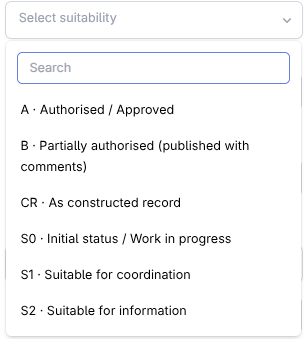
A Suitability code says what a revision is fit for: for information, for review, for construction. Every code carries a stage: WIP for work still in progress, or PUBLISHED for issues that are ready to go out. The register shows the code and stage together in the Suitability column.
app.fluxems.com
The register Suitability column showing codes with their WIP or PUBLISHED stage next to the Discipline column
Suitability in the register: the code plus its WIP or PUBLISHED stage.

Disciplines and suitability codes are lists your workspace admins configure, so they match how your company actually numbers and issues documents. See Configure document settings.

Related articles

  • Configure document settingsWorkspace administration
  • The document registerDocuments
  • Understand versions and revisionsDocuments

What's next?

Metadata says what a document is. Access controls say who sees it.

  • Confidentiality levels and private documents

See it on the platform

Document control

Was this page helpful?

Review and approve documentsConfidentiality levels and private documents

Need help? Contact support.

See what shipped in the changelog.

Questions about pricing? Talk to sales.

Something down? Check the platform status.

Found a bug in the product? Report an issue.

Missing something? Request a feature.

On this page

  • How a Document Reference is built
  • Discipline codes
  • Suitability codes and their stage
fluxems

Flux Enterprise Management System: documents, projects, people, mail and deadlines on one accountable record, in the words your team already uses.

All systems operational

Product

  • Platform overview
  • Document control
  • Review and markup
  • Project delivery
  • Bids and proposals
  • Calendar and tasks
  • Forms and checklists
  • Built-in mail
  • Change log and audit
  • Contacts

Industries

  • Construction
  • Architecture and engineering
  • Legal
  • Consulting
  • Property
  • Field services
  • Healthcare
  • Agencies
  • Manufacturing
  • All industries

Resources

  • Help Center
  • Blog
  • Pricing
  • Changelog
  • Status
  • Report an issue
  • Request a feature

Company

  • About
  • Start free trial
  • Talk to us about Enterprise
  • Contact
  • Sales
  • Support
A product ofEntrebyte Technologies
© 2026 fluxems · Flux Enterprise Management System · Johannesburg, South Africa
TermsPrivacyRefundsCookie Policy