
Browse the Help Center
Triage with labels
Use the four labels and the reply banners to see what each message needs and work the inbox down to zero.
1 min read
An inbox is only useful if you can tell what each item needs from you. Labels and reply banners give you that at a glance, so you can work the list from top to bottom without opening everything twice.
The four labels
Labels live in the mailbox rail under Labels. Apply one to a message to mark what it needs, and click a label in the rail to see everything carrying it.
| Label | What it means |
|---|---|
| Action Required | Something in this thread is waiting on you or your team. |
| For Information | Sent to keep you in the loop. No response needed. |
| Acknowledged | You have confirmed receipt. Nothing further to do. |
| Superseded | Overtaken by a newer revision or message. Kept for the record. |
Reply banners
On top of your labels, fluxems tracks where each conversation stands and shows a banner on the message.
- Awaiting you means the next move is yours. Respond.
- Awaiting reply means you have responded and the other party owes the next move.
- Answered means the thread is resolved.
Work the inbox down
- 1
Switch the message list to the Unread tab.
- 2
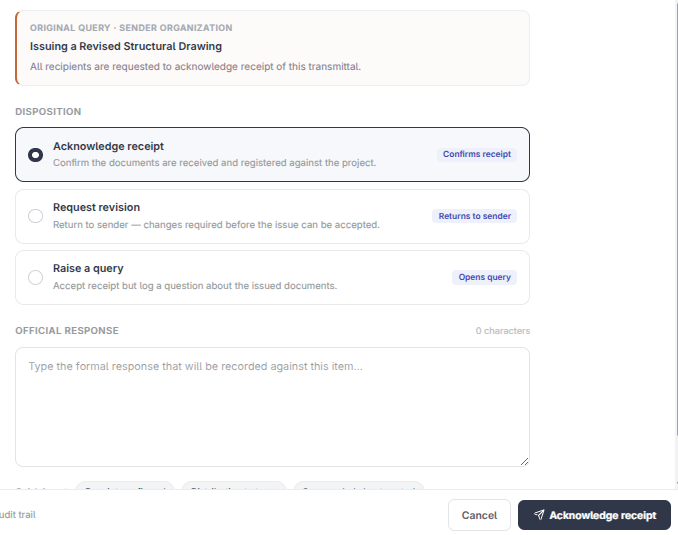
Open anything marked Awaiting you first and click Respond. A transmittal offers Acknowledge, Request revision, or Raise query. An RFI offers Answered, Need clarification, or Forward to consultant.
- 3
Label the rest: For Information for the loop-ins, Acknowledged once you have confirmed receipt.
- 4
Archive what is done. An empty Unread tab means nothing is waiting on you.
Tip
Treat Action Required as your correspondence to-do list. If it is empty at the end of the day, nothing on the project is stuck on you.
See it on the platform
Built-in mailWas this page helpful?
Need help? Contact support.
See what shipped in the changelog.
Questions about pricing? Talk to sales.
Something down? Check the platform status.
Found a bug in the product? Report an issue.
Missing something? Request a feature.