
Browse the Help Center
Welcome to fluxems
A five minute tour of your workspace: the sidebar, the top bar, and where each module lives.
1 min read
fluxems puts your documents, projects, transmittals, RFIs, mail, tenders, tasks, and contacts in one workspace. This tour shows you where everything lives, so the rest of these guides make sense.
The sidebar
The sidebar on the left is how you move between modules. Everything under the Your workspace heading is shared with your team.
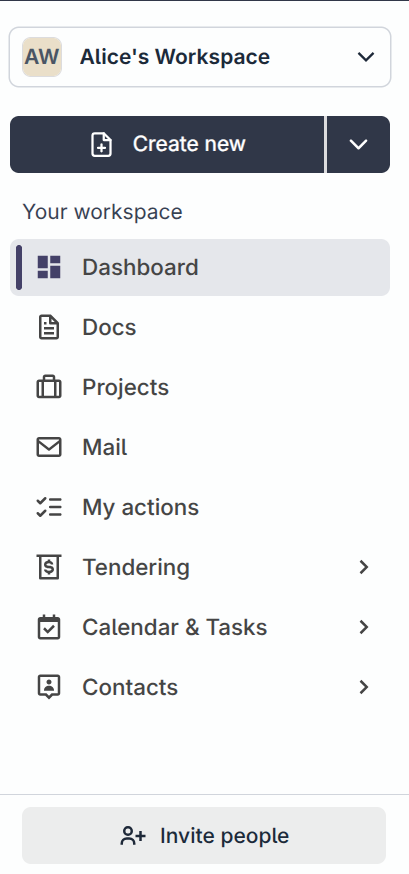
- Dashboard is your personal start page: what needs your attention, recent activity, and project health.
- Docs holds workspace documents that do not belong to a specific project.
- Projects lists every project you can see. Open one and the sidebar changes to that project's sections.
- Mail is your project inbox: transmittals, RFIs, and documents that need something from you.
- Tendering has two views: Register for tenders you are tracking, and Find tenders for public opportunities.
- Calendar & Tasks keeps your personal to-do list and the shared calendar.
- Contacts holds people and organisations, with Search contacts and Organizations views.
Tip
The Create new button at the top of the sidebar is the fastest way to start a project or a tender from anywhere.
The top bar
- 1
Click the fluxems logo at any time to return to your Dashboard.
- 2
Use the Search box to find projects, tasks, and documents across the whole workspace.

- 3
Click the bell to see notifications, and your avatar for Profile, Settings, and Log out.
Switching workspaces
If you belong to more than one workspace, click the workspace name at the top of the sidebar to switch. Each workspace has its own projects, people, and settings.
Was this page helpful?
Need help? Contact support.
See what shipped in the changelog.
Questions about pricing? Talk to sales.
Something down? Check the platform status.
Found a bug in the product? Report an issue.
Missing something? Request a feature.